

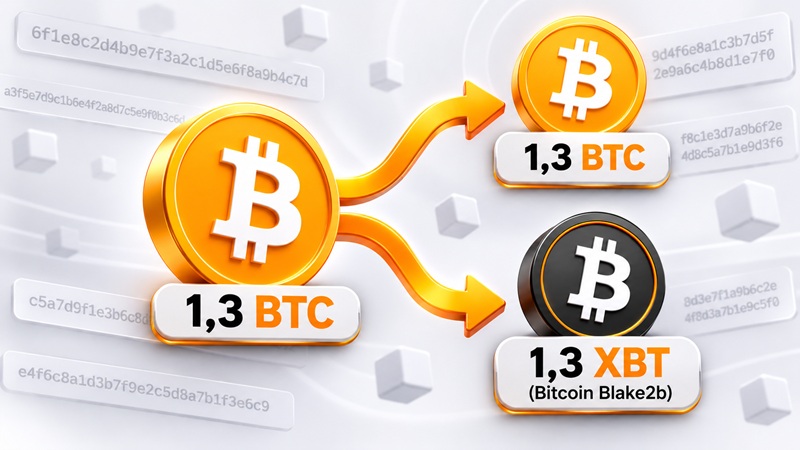
 The original Bitcoin network split into two chains, Bitcoin (BTC) and Bitcoin Blake2b (XBT or BTCB2), on August 30, 2026, at block 961640. From that moment on, every BTC holder can claim exactly the same amount of XBT. Below we explain how to claim your XBT as quickly and safely as possible without putting your Bitcoin at risk, and of course how to profit from this event.
In this article we won't spend much time on the changes that caused the Bitcoin hard fork into two separate chains. The main difference of the new Bitcoin (XBT) is the switch from SHA256 to the Blake2B mining algorithm. The algorithm itself isn't new: it appeared back in 2015 together with the SIA cryptocurrency.
For holders of the original Bitcoin, this is a chance to get Bitcoin Blake2B coins completely free, in exactly the same amount as the Bitcoin you hold.
Today one XBT coin (sometimes also called BTCB2) is worth around 300 USDT, or 0.4% of the BTC price.
To claim XBT, the developers themselves suggest sending your BTC to their (twice-forked) Bitcoin Knots wallet, performing the "split" there, then withdrawing the XBT to another wallet and sending your BTC back to storage. A quick clarification: Bitcoin Knots is a fork of Bitcoin Core for Bitcoin Cash that was modified once again to support Bitcoin Blake2b. For Bitcoin Knots to work, it has to sync with the blockchain just like the original Bitcoin Core, which can take several weeks and requires a fast SSD of at least 1 TB.
These are technical details that can be solved, but the security issues don't go anywhere: few people want to send their precious Bitcoin to a suspicious wallet. Chasing a 0.5% gain, you can easily lose all your assets by entering your seed phrase or private keys into unknown apps.
This is where things get interesting. Next, we'll show you how to claim the XBT fork coins without risking your BTC. You won't even need to wait weeks for Bitcoin Knots to sync, and the whole process takes no more than an hour.
KEY RULE: Run all Bitcoin Blake2b software on a separate computer or device, not on the one where you store your BTC.
How to Check Your Wallet Balance for Bitcoin Blake2B (XBT)
Before splitting your Bitcoin, first check whether your wallet holds any XBT.
To do this, use the blockchain explorer Mempool.guide.
Paste your Bitcoin wallet address into the search bar. If you see a non-zero balance, it's worth spending a little time to claim these XBT coins for free.
The site says everywhere that your wallet holds Bitcoin, but it actually shows your balance in Bitcoin Blake2B (XBT) coins: this site is an exact copy of Mempool.space (for the original BTC), only connected to the Bitcoin Blake2b blockchain.
Guide: How to Claim Bitcoin Blake2b (XBT) Quickly and Safely
The main difficulty in claiming Bitcoin Blake2B is that all transactions from the main BTC network are replayed on the fork network. In other words, you can't simply move all your BTC from one wallet to another, paste the old wallet's private key into Bitcoin Knots and get your forked coins, as you could with other forks (Bitcoin Cash, Bitcoin Gold).
Until your BTC are split into BTC and XBT, the forked XBT coins will move together with your BTC, so unfortunately the old 2017 method of claiming fork coins doesn't work here.
We won't even consider the standard method offered by the developers, as it clearly fails to meet security requirements. Let's move straight to safer options.
The simplest and probably safest way for a BTC holder to claim XBT:
1 Send already-split BTC to your wallet.
2 Send all BTC from this address (your unsplit coins plus the split ones you received) to another wallet of yours.
3 Wait for your BTC transfer to be confirmed on the network.
4 Export the private key and import the private key (seed phrase) of your old BTC wallet into a Bitcoin Blake2b wallet.
5 Send the XBT to the NEOXEX exchange or to another wallet for storage.
Now let's go through each step in detail:
1 To split the coins, we won't use special software or enter special commands to separate the blockchains. We'll do something much smarter.
We'll use a property of the blockchain itself: more precisely, the Bitcoin Blake2b network rejecting a transaction created on the main Bitcoin network. Since transactions are duplicated on both networks, we need the transaction to be rejected on the Blake2b chain but go through on Bitcoin, moving all our original Bitcoin to another address, while on Blake2b everything stays where it was.
For this, we need to add a small amount of BTC to our wallet that someone has already split before us. Even 0.0001 BTC is enough.
Now we need to decide where to get already-split BTC:
- split 0.0001 BTC yourself, with a small risk of losing that BTC (maximum anonymity, detailed guide below)
- buy it on a crypto exchange that supports this fork (NONKYC, NeoEX). I don't recommend this, as it can taint all your BTC and AML services may flag them as dirty, so you won't be able to sell them on major CEX exchanges.
- buy BTC on a major CEX exchange, withdraw it to a separate wallet and check it for XBT. If there's no XBT, send it on to your main wallet.
Note: Each input (address) needs its own already-split bitcoin. You can first consolidate all wallets, forward your BTC to the next address one by one, or split each address independently of your other wallets. The strategy depends on why you keep your BTC on separate addresses.
For testing, I personally used two options: splitting in the Shrike wallet for Bitcoin Blake2B and withdrawing BTC from the major CEX exchange Bybit. Although the exchange doesn't support this hard fork, BTC withdrawn from its addresses is already split.
Whichever method you choose, you'll need a Bitcoin Blake2b wallet anyway. You can download the Shrike wallet here. The full list of wallets supporting XBT is available on XBT.live
Withdrawing from an exchange to your wallet is straightforward; the main thing is to make sure that only BTC, without XBT, arrived in your wallet. To check, look up your wallet on Mempool.guide: the latest transfer from the exchange should not appear there, while it will show up in a BTC block explorer. In this case, install an XBT wallet such as Shrike as described below and go straight to step 2.
Let's look at the hardest option: splitting Bitcoin yourself
With the Shrike wallet, you need to connect to a Bitcoin Blake2B server.
There are two options:
- The safer and more private one: run your own node by installing Bitcoin Knots or Fulcrum, sync it with the blockchain and connect the Shrike wallet to it. It's not 100% safe, since the software may contain malicious code. That's why it's important to move your original BTC to another wallet first and run the XBT software on a separate device.
- Connect to a public XBT node. With this option, the risk of exposing your private key is higher.
I used the second option as simpler and faster, since I was sure my original BTC were safe and I was ready to accept losing the XBT received. But to minimize the risk of a private key leak even then, I used the public node from the developer of the Kilowallet wallet for Android and iOS. He also runs his own public node to support the Bitcoin Blake2B mobile wallets. The public node's description states that server logs are disabled for maximum security, but that's not very reassuring.
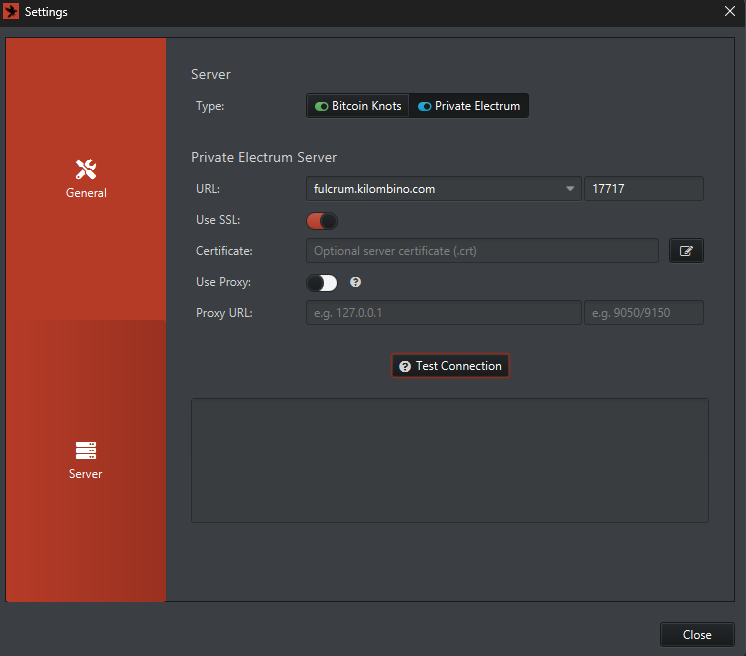
In the server settings, select Private Electrum.
URL: fulcrum.kilombino.com
Port: 17717
USE SSL: Enable
Click the Test Connection button
Next, you'll be prompted to create a new wallet. Create one by generating a 24-word seed phrase: click the GENERATE NEW button.
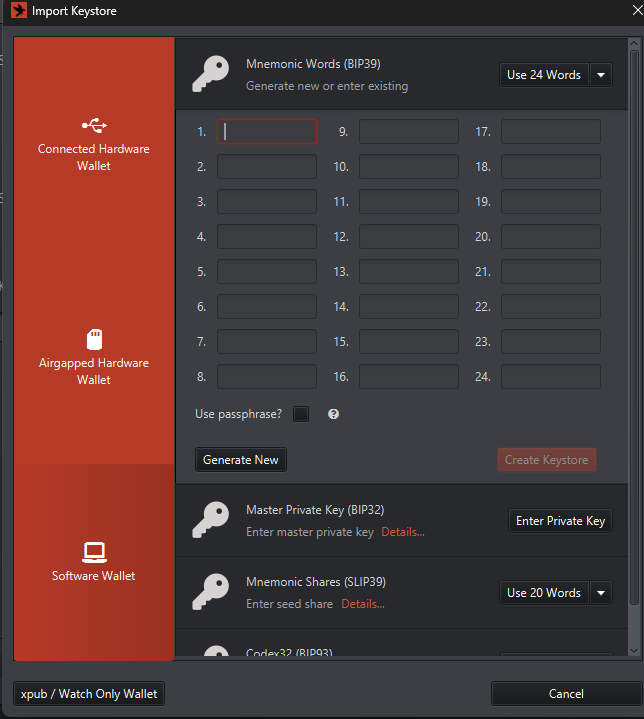
WRITE DOWN the seed phrase. You'll need it later.
You can optionally password-protect the wallet: check Use passphrase if needed.
Send a small amount of BTC from your BTC wallet to the wallet created in Shrike, for example 0.0001 BTC.
Wait for 6 block confirmations, then send the XBT to another address within the same wallet (you can pick an address from the Addresses menu on the right) or straight to an exchange.
The key thing is that the green Replay Protected checkmark is shown when sending. Shrike enables this setting by default for all transactions. If XBT is sent without Replay Protected, the split won't happen and your original BTC will be sent to the same destination along with the XBT.
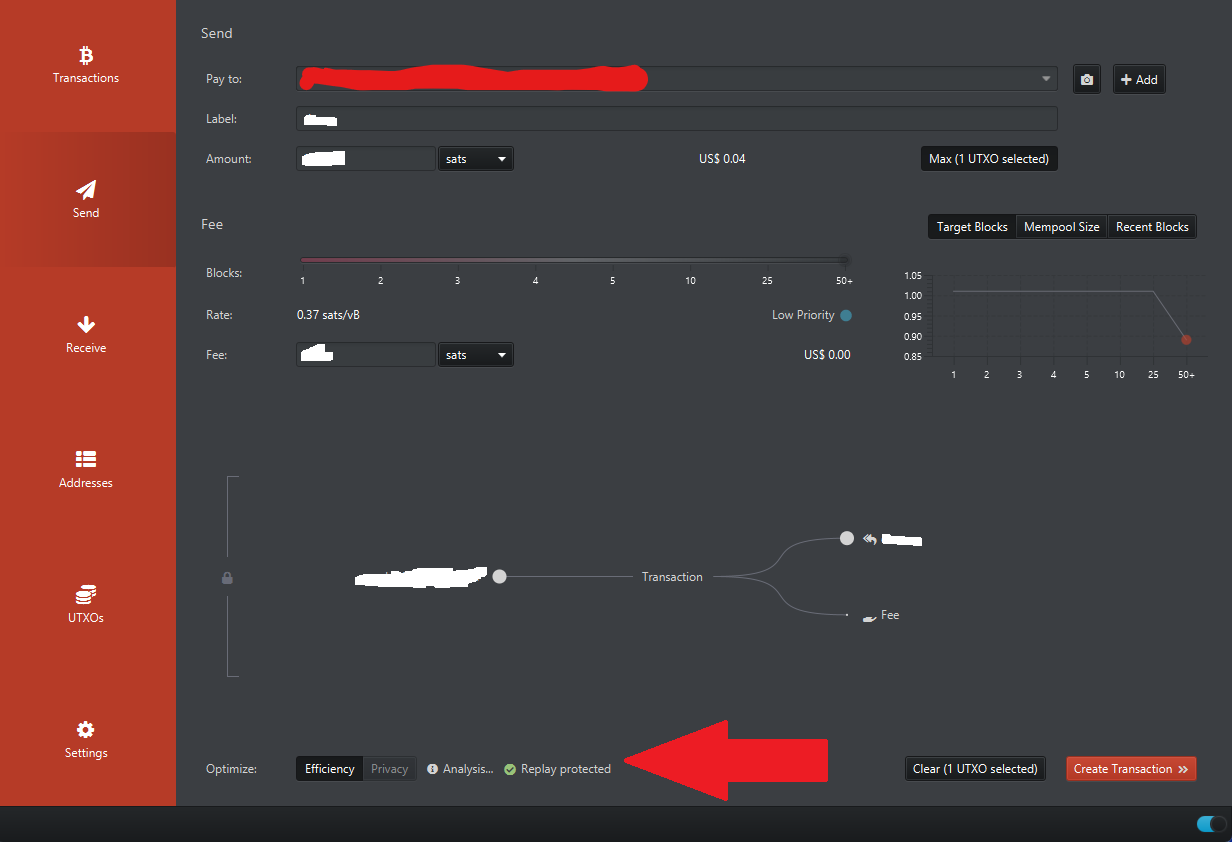
Set the transaction fee to 200 satoshis or more, as lower fees may take hours or even days to process due to competition with transactions from the main BTC network, where fees are much higher.
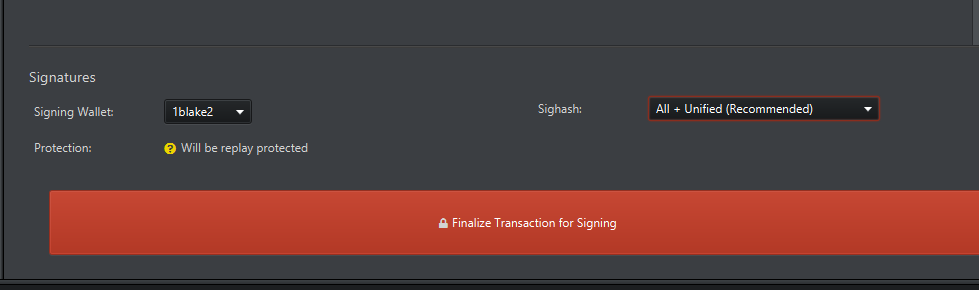
Next, to get your 0.0001 BTC back, download the Sparrow wallet for BTC. Its interface is an exact copy of the Shrike wallet. Connect it to a public node from the list inside the wallet. Then choose import and paste the seed phrase from your Shrike wallet.
You'll see your 0.0001 BTC in the balance; send it back to the BTC wallet you want to split.
As a result, we have 0.0001 XBT on the exchange (or in the Shrike wallet) and 0.0001 BTC on the address holding the main BTC amount, which we'll now safely split from XBT.
2 So, you've chosen where to get original BTC without XBT and sent it to your BTC address. At this step, send your original BTC to a new BTC wallet prepared in advance.
IMPORTANT: Always create a new wallet with a new seed phrase or master private key. Sending to another address within the same wallet is NOT SAFE.
The key idea of this step is to send ALL coins without exception (your original unsplit BTC and the split BTC you received) from one address (input) to another address in ONE transaction.
IMPORTANT: If your seed phrase belongs to a multi-currency wallet, you must move not only Bitcoin to the new wallet but also all other assets stored in it: ETH, XRP, Doge, Solana, USDT and so on.
If you use several addresses in one wallet, spend from a single input only to split correctly. In Bitcoin Core this feature is disabled by default, so enable it in the settings. When sending, specify that only one input (address) may be used. If that's not possible, either consolidate all inputs on one address or send already-split BTC to each address.
The original Bitcoin network will accept this transaction without any issues, and the BTC blockchain will confirm it. But on the Bitcoin Blake2B network the transaction will be rejected, because you're requesting to send more than your XBT balance. That's exactly why we needed the already-split BTC: to create this situation.
Bitcoin moves to the new wallet, while XBT stays in the old wallet.
3 At this step, you must wait for the transfer of your original BTC to the new address to be confirmed. At least 1 network confirmation is required, 6 confirmations are better.
At the next step, the risk of your BTC private key being compromised is high, and a hacker could create a new transaction on your behalf with a higher fee, sending your coins to their own wallet. Miners prioritize transactions with higher fees, so the hacker's transaction could be recorded on the blockchain first, and you'd lose all your BTC.
4 You've moved your BTC together with the split 0.0001 BTC to a new wallet and waited for the transfer to be confirmed on the blockchain. Now open the Shrike wallet. In the menu, find the import wallet option and paste the private keys or seed phrase of your now-old wallet (which holds nothing but XBT).
Note: Bitcoin Core command to export the master private key: listdescriptors true
Your balance will show the same amount of XBT as you had in BTC before the split.
5. For safer storage, I recommend moving all XBT to another wallet, as there's always a risk of your private keys being compromised. You can create one in Shrike as well.
If you don't plan to hold Bitcoin Blake2B, only two exchanges currently trade this asset: NoKYC and NEOXEX. Liquidity on both is very low, as selling even 1 XBT can drop the price by 10%, but NEOXEX has slightly better liquidity.
Either way, both options carry risk, as they run no AML checks on assets and no KYC checks on users. So be careful when withdrawing USDT, USDC and other cryptocurrencies: don't send them to your main wallets, to avoid tainting your main assets with dirty crypto.
Conclusion: The method we've described for claiming Bitcoin Blake2b from original BTC is much safer than the one offered on the fork developers' official website. It's also considerably simpler if you withdraw already-split BTC from an exchange rather than splitting it yourself. If maximum privacy and security matter to you, splitting it yourself is the only option.
P.S. The method we suggest for claiming Bitcoin Blake2B may seem simple and obvious, but testing it ourselves and proving that it's 100% working and safe took us many hours. And just as much time to tell you about this experiment. If you found this material and our experience useful, we'd be grateful for any XBT donation to this address: 1LrfHywLuuh4gwS9vRUev65gYFrAq8Hev5