
 Quantus (QUAN) is a new Proof-of-Work cryptocurrency that launched its mainnet on September 9, 2026. The project focuses on post-quantum cryptography, privacy, and the use of Poseidon2 technology for PoW consensus. At launch, the main way to obtain QUAN is through GPU mining. The official Quantus Miner, several third-party optimized miners, and several mining pools are already available. In this article, we will look at what Quantus is, how to set up QUAN mining on NVIDIA and AMD GPUs, which miners to use, how to connect to a pool, and what to consider when choosing hardware.
What Is Quantus (QUAN)?
Quantus is positioned as a blockchain and digital money designed to protect against potential threats from quantum computers.
The project describes Quantus as quantum-safe encrypted money with a limited supply. QUAN enters circulation through Proof-of-Work, meaning that anyone with suitable hardware can participate in securing the network and receive rewards for finding blocks.
Key project features:
- Coin type: Proof-of-Work;
- limited maximum supply;
- mining algorithm based on Poseidon2;
- GPU mining support;
- post-quantum cryptography;
- private and encrypted transactions;
- its own mobile wallet;
- open-source core project components.
The Quantus mainnet launched on September 9, 2026. This date is also listed in the project's current whitepaper as the Mainnet Genesis.
Quantus Specifications
- Coin: Quantus
- Ticker: QUAN
- Algorithm: QPoW / Poseidon2
- Consensus: Proof-of-Work
- Mainnet: September 9, 2026
- Maximum supply: 21 million QUAN
- Mining: GPU / CPU
- Target block time: approximately 12 seconds
- Wallet: iOS / Android
- Explorer: Quantus Explorer
- Exchange: SafeTrade
Quantus uses PoW based on Poseidon2. However, the use of Poseidon2 is primarily related to the efficiency of zero-knowledge proofs and compatibility with proof systems rather than being a post-quantum security mechanism by itself. The target block time is approximately 12 seconds.
Why Is Quantus Interesting to Miners?
The main reason for the interest in Quantus is the launch of a new PoW network with a limited supply and the ability to mine it using conventional graphics cards.
As is often the case with new coins, the first hours and days after a network launch are particularly interesting for miners. On the one hand, the network difficulty and total hashrate may still be relatively low at launch. On the other hand, large mining farms can arrive very quickly on popular new coins.
As a result, Quantus profitability can change very rapidly.
After the network launch, members of the community began reporting a sharp increase in total hashrate and the arrival of large miners. This means that calculating profitability based on the first few hours of network operation can be risky - the situation can change within just a few hours.
Quantus Mining Algorithm
Quantus uses a PoW algorithm based on Poseidon2. Poseidon2 is a modern hash function designed for efficient use in zero-knowledge proof systems. Quantus uses the Goldilocks field and Plonky2 in its ZK infrastructure.
For miners, the more important point is that the algorithm has been implemented for GPUs, making it possible to mine QUAN on modern NVIDIA and AMD graphics cards.
Currently, the most interesting options include:
- NVIDIA RTX 30;
- NVIDIA RTX 40;
- NVIDIA RTX 50;
- AMD Radeon GPUs based on RDNA architecture;
- some other compatible GPUs.
The official Quantus Miner supports GPUs through a modern GPU backend, while third-party miners can provide significantly higher performance.
Quantus Miners
Several software options are currently available.
-
Official Quantus Miner. The official miner was developed by the Quantus team and is distributed through GitHub. At the time of the mainnet launch, the current branch is v4.x, while release v4.1.0 is already available on GitHub. The official miner supports GPU, CPU, and hybrid CPU+GPU modes. The documentation provides parameters for selecting GPUs, the number of CPU workers, and GPU load limits.
-
SRBMiner-MULTI. For GPU owners, SRBMiner-MULTI is one of the most interesting options. In version 3.6.4, the developer added the quantus algorithm for NVIDIA and AMD RDNA GPUs. The miner fee for this algorithm is 2.5%. This version also introduced the --tls-cert-sha256 parameter for connecting to Quantus QUIC pools. GitHub - SRBMiner-MULTI. For NVIDIA 5000-series GPUs, driver version 580 or newer is recommended. The SRBMiner developer also recommends trying the following setting: --gpu-mclock 810 for Quantus.
-
Quanpool Miner. Quanpool has its own miner. This is third-party software, so before using it, we recommend checking the downloaded binary yourself and, whenever possible, using only official links from the project or pool.
-
PearlFortune Quantus Miner. Another third-party option.
Which Miner Should You Choose?
For the first launch, we recommend starting with SRBMiner-MULTI or the official Quantus Miner. SRBMiner is convenient because it supports a large number of different algorithms and has ready-made implementations for both NVIDIA and AMD. The official Quantus Miner is worth trying for comparison purposes. At the same time, the optimization situation for a new algorithm changes very quickly. Therefore, within a few days of launch, the performance of different miners may differ significantly from what is observed today.
Quantus Mining Pools
Several pools are currently available:
When choosing a pool, pay attention not only to the fee, but also to its total hashrate, connection stability, minimum payout, and number of miners.
LuckyPool and SRBMiner
SRBMiner 3.6.4 officially lists support for Quantus LuckyPool. The connection endpoint is: eu.lproute.com:5660. LuckyPool can use a Stratum connection, while other Quantus pools may use QUIC. For QUIC connections, SRBMiner requires the additional --tls-cert-sha256 parameter. Always check the current connection parameters directly on the pool's website.
Creating a Quantus Wallet
Before starting mining, we need a QUAN address. Quantus provides a mobile wallet for iOS and Android. The official project website contains links to both the App Store and Google Play.
Official wallet: Quantus Wallet. The source code for the applications is also available on GitHub: Quantus Apps.
After creating the wallet:
- save your seed phrase;
- write it down and store it in a secure place;
- obtain an address for receiving QUAN;
- use this address in your miner configuration;
- never share your seed phrase or private keys with anyone.
Setting Up Quantus Mining on Linux
Let's look at how to run Quantus using SRBMiner-MULTI. Download the Linux version of Linux-версию SRBMiner 3.6.4: SRBMiner-MULTI 3.6.4 Linux.
Extract the archive:
tar -xvf SRBMiner-Multi-3-6-4-Linux.tar.gz
cd SRBMiner-Multi-3-6-4
Check the available GPUs:
./SRBMiner-MULTI --list-devicesThen create a simple launch script. For example:
#!/bin/bash

./SRBMiner-MULTI \
  --algorithm quantus \
  --pool eu.lproute.com:5660 \
  --wallet YOUR_QUAN_ADDRESS \
  --password x \
  --gpu-mclock 810
Replace YOUR_QUAN_ADDRESS with your own wallet address. Save the file, for example:
nano start.shMake it executable:
chmod +x start.shThen run it:
./start.shAfter starting, the miner should begin displaying found shares, current hashrate, and GPU statistics.
An Important Note About QUIC
Quantus pools may use two connection methods:
- LuckyPool Stratum;
- QUIC.
SRBMiner supports both methods, but QUIC requires the SHA-256 certificate fingerprint to be specified using --tls-cert-sha256. Therefore, do not copy a fingerprint from random guides. Use the current value published by the specific pool or obtained from its official documentation.
Quantus Mining in HiveOS
SRBMiner can also be used with HiveOS. To do this, create a Flight Sheet and select: Miner → Custom Miner. For SRBMiner 3.6.4, the following Installation URL can be used: https://github.com/doktor83/SRBMiner-Multi/releases/download/3.6.4/srbminer_custom-3.6.4.tar.gz
This method is explicitly specified by the SRBMiner developer for a custom HiveOS miner. In the Extra config arguments field, enter the SRBMiner parameters. For example:
--algorithm quantus --pool eu.lproute.com:5660 --wallet %WAL% --password x --gpu-mclock 810If you use a different pool, replace the pool address with the current one. After saving the Flight Sheet, start mining. After some time, HiveOS should display statistics for hashrate, temperature, and GPU power consumption.
Setting Up Mining on Windows
For Windows, download the appropriate SRBMiner archive: SRBMiner-MULTI 3.6.4 Windows. Extract it to a separate folder. Create a file named start.bat with the following contents:
SRBMiner-MULTI.exe --algorithm quantus --pool eu.lproute.com:5660 --wallet YOUR_QUAN_ADDRESS --password x --gpu-mclock 810
pause
Remember to replace YOUR_QUAN_ADDRESS with your own wallet address. Then run start.bat.
If everything is configured correctly, the console will display information about the GPU, hashrate, and accepted shares.
Quantus GPU Hashrates
At the time of the Quantus launch, the network is still at the very beginning of its lifecycle, so it is too early to provide one "correct" hashrate table.
Performance depends heavily on:
- GPU model;
- driver version;
- miner version;
- overclocking settings;
- power limit;
- specific miner optimizations;
- algorithm version.
However, here are some hashrates that were obtained at the time of the network launch:
- Geforce RTX 5070Ti: 650 MH
- Geforce RTX 5060Ti: 330 MH
- Geforce RTX 5080: 730 MH
- Geforce RTX 5090: 1200 MH
- CMP 90HW: 300 MH
How to Calculate Quantus Mining Profitability
QUAN profitability is particularly difficult to estimate at launch. During the first hours after launch, very sharp changes can occur: more miners → higher total hashrate → fewer coins per unit of your hashrate. Therefore, profitability observed immediately after launch may become significantly lower just a few hours later.
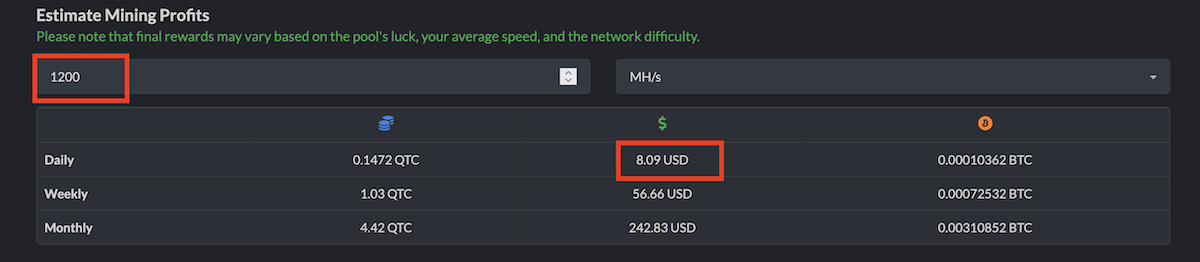
Even now, however, it is possible to get an approximate real-time profitability estimate using the mining calculator on Quantus LuckyPool. At the time of writing, on September 10, the profitability of a single RTX 5090 was around $8 per day. The new coin has also already been added to the Profit-mine.com mining calculator.
Is It Worth Mining Quantus Right Now?
Quantus is interesting primarily as a new GPU-mineable coin at the launch of its mainnet.
Pros:
- new PoW network;
- limited supply;
- GPU mining;
- several miners;
- several pools;
- mobile wallet;
- trading is already available on SafeTrade;
- active project development.
Cons:
- rapidly increasing total hashrate;
- high competition among miners;
- a new network with potential technical issues;
- third-party pools are not necessarily official;
- launch profitability can change within a few hours;
- some third-party miners require additional security checks.
The official Quantus documentation itself emphasizes the normal implementation and development risks associated with blockchain technology, so a new asset should not be viewed as guaranteed profitable mining.
Quantus is a very new network, so we recommend exercising caution with third-party software and new mining pools. This is particularly important for binaries distributed through Telegram, file-sharing services, and unknown websites.
Before starting:
- check the link to the official GitHub repository;
- verify release hashes if the developer publishes them;
- do not run the miner as root unless required;
- never provide your seed phrase to third-party services;
- use a separate wallet for experimenting with a new coin.
Conclusion
Quantus is one of the new GPU-mineable coins worth watching in September 2026. The project launched its mainnet on September 9 and offers a Proof-of-Work model using a modern algorithm based on Poseidon2, with a focus on post-quantum cryptography.
To start mining, you only need to create a QUAN wallet, choose a pool, and launch a suitable miner. The easiest option for GPU mining is to try SRBMiner-MULTI 3.6.4 or the official Quantus Miner and compare the resulting hashrate. At the same time, keep in mind that Quantus has only just entered mainnet. The network's total hashrate and difficulty are likely to change rapidly, and profitability will change accordingly.
And now for the most interesting part - miner results! If you have already started mining Quantus, please share your results in our Telegram chat: GPU model → hashrate → power consumption → miner → pool → overclocking settings.
This information will be very useful to other users. Also, don't forget to subscribe to our Telegram channel. We also recommend subscribing to Mining Soft Alerts, where we publish new miner versions with minimal delay. Good luck and profitable mining!